Pacelab Timer

HIIT timing,
without the clutter.

Set work and rest, stack sets and rounds, add a round break — then run a voice-guided session. No workout builder, no account, no subscription.

  • 100% free
  • Voice-guided
  • Works offline
Pacelab Timer during a work interval

Built for HIIT

Everything you need. Nothing you don't.

Work & rest intervals

Dial in work and rest seconds with +/− controls. Perfect for Tabata-style 40/20 or your own ratio.

Sets, rounds & round reset

Stack multiple sets per round, run several rounds, and add a longer break between rounds when you need it.

See the full session upfront

Review total time, interval count, and what's next before you hit start — no surprises mid-workout.

Voice-guided cues

Audio calls for work, rest, and round transitions so you can keep eyes on the floor, not the screen.

How it works

Set up → preview → run.

Customize work, rest, sets, and rounds

1. Configure

Adjust work, rest, sets, rounds, optional warmup, and round reset.

Ready to start workout summary

2. Preview

Check total duration and interval breakdown before you start.

Active work interval with large timer

3. Train

Large timer, phase label, progress bar, and skip controls while you work.

Need more?

Want a full workout builder?

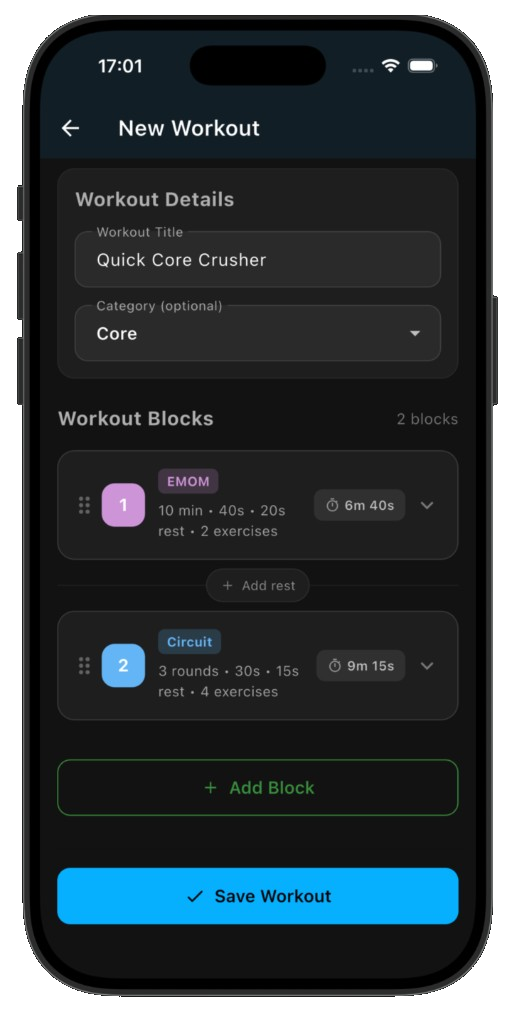
Pacelab Intervals adds Tabata, AMRAP, EMOM, circuits, 100+ exercises, share links, and AI integrations — still free.

Explore Pacelab Intervals
Pacelab Intervals workout builder

Get Pacelab Timer

Free on iOS and Android. No account required.

FAQ

Is Pacelab Timer free?
Yes. No subscription, paywall, or ads.
Do I need an account?
No. Open the app, set your intervals, and start.
What's the difference from Pacelab Intervals?
Timer is a focused HIIT clock — work/rest, sets, rounds. Pacelab Intervals is the full builder with exercises, block types, sharing, and AI.
Does it work offline?
Yes. Once configured, your session runs without internet.